Tuning-specific arpeggio diagram
C# Augmented Arpeggio in Open D Tuning
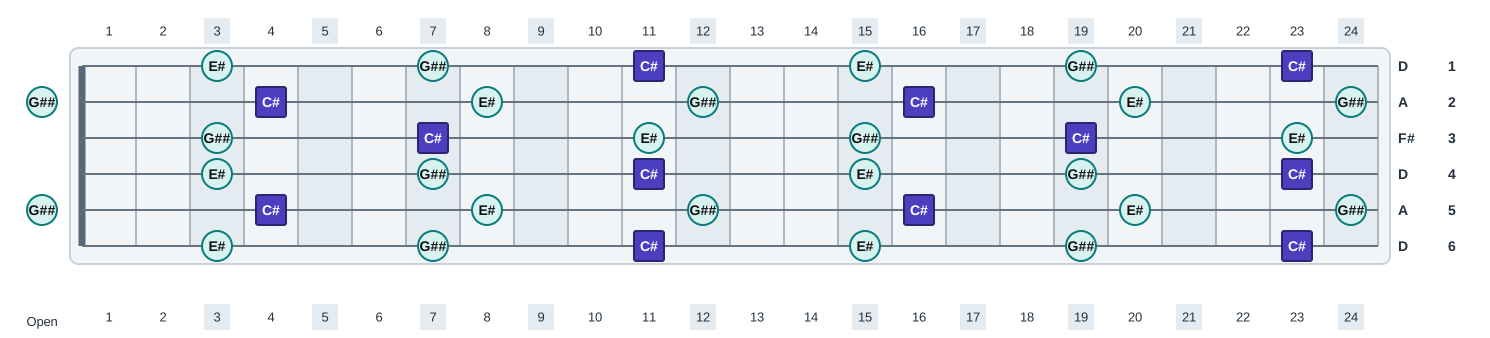
C# Augmented Arpeggio in Open D Tuning shows the same c# augmented arpeggio chord tones across 6 strings tuned D A D F# A D. The tuning changes where the same chord tones sit across the fretboard.
- Chord tones
- C#, E#, G##
- Formula
- 1 3 #5
- Semitones
- 0 4 8
- Chord symbols
- C#aug, C#+
- Tuning
- D A D F# A D
- Strings
- 6
- Open pitch range
- D2 to D4
- 24-fret range
- D2 to D6
Open strings and root positions
2 of the 6 open strings belong to C# Augmented Arpeggio: string 5 G## (#5) and string 2 G## (#5). None of those open-string tones is the C# root, so the root must be fretted on every string.
String 5G###5
String 2G###5
First root on each string
String 6Fret 11
String 5Fret 4
String 4Fret 11
String 3Fret 7
String 2Fret 4
String 1Fret 11
Low-string pattern
On the lowest D string, the first-octave arpeggio pattern falls at frets 3, 7, and 11, with the C# root at fret 11. On the highest D string, the first C# is at fret 11.
Fret 3E#3
Fret 7G###5
Fret 11C#1
Practice this tuning-specific layout
- Play C# Augmented Arpeggio on the low D string at frets 3, 7, and 11, saying each note name and degree aloud.
- Build a phrase that lets G## on open string 5 ring, then connect it to the nearest C# root and two other arpeggio tones.
- Connect the C# root positions on strings 6 through 1 at frets 11, 4, 11, 7, 4, and 11, adding the nearest arpeggio tone between each pair of roots.
Fretboard diagram
Open this diagram in the fretboard tool
Start with C# Augmented Arpeggio and open d tuningloaded, then adjust labels, colors, fret count, and orientation.
Open in interactive fretboardReference pages
Related diagrams in this tuning
Related scale diagrams in this tuning
Same arpeggio in other tunings
E Flat Standard TuningEb Ab Db Gb Bb EbD Standard TuningD G C F A DC Standard TuningC F Bb Eb G CB Standard TuningB E A D F# BDrop D TuningD A D G B EDrop C# TuningC# G# C# F# A# D#Drop C TuningC G C F A DDrop B TuningB F# B E G# C#DADGAD TuningD A D G A DOpen E TuningE B E G# B EOpen G TuningD G D G B DOpen C TuningC G C G C EOpen A TuningE A E A C# E7-String Standard TuningB E A D G B E7-String Drop A TuningA E A D G B E7-String Drop G TuningG D G C F A D8-String Standard TuningF# B E A D G B E8-String Drop E TuningE B E A D G B E