Tuning-specific arpeggio diagram
C# Power Chord Arpeggio in DADGAD Tuning
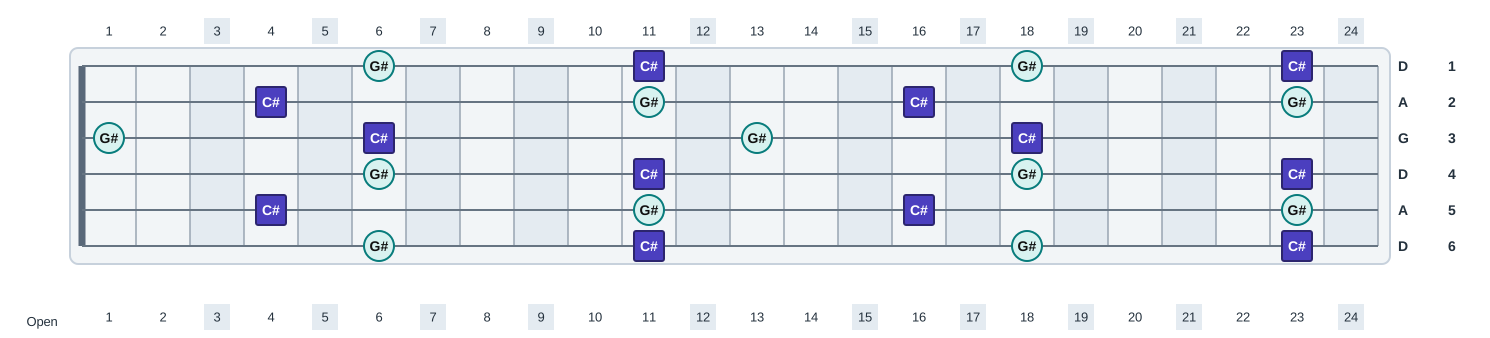
C# Power Chord Arpeggio in DADGAD Tuning shows the same c# power chord arpeggio chord tones across 6 strings tuned D A D G A D. The tuning changes where the same chord tones sit across the fretboard.
- Chord tones
- C#, G#
- Formula
- 1 5
- Semitones
- 0 7
- Chord symbols
- C#5
- Tuning
- D A D G A D
- Strings
- 6
- Open pitch range
- D2 to D4
- 24-fret range
- D2 to D6
Open strings and root positions
None of the 6 open strings belongs to C# Power Chord Arpeggio. Every arpeggio tone must therefore be fretted, beginning with the first available tone on the low D string.
First root on each string
String 6Fret 11
String 5Fret 4
String 4Fret 11
String 3Fret 6
String 2Fret 4
String 1Fret 11
Low-string pattern
On the lowest D string, the first-octave arpeggio pattern falls at frets 6 and 11, with the C# root at fret 11. On the highest D string, the first C# is at fret 11.
Fret 6G#5
Fret 11C#1
Practice this tuning-specific layout
- Play C# Power Chord Arpeggio on the low D string at frets 6 and 11, saying each note name and degree aloud.
- Play the arpeggio without using an open string, then stop on the nearest C# root each time the line changes strings.
- Connect the C# root positions on strings 6 through 1 at frets 11, 4, 11, 6, 4, and 11, adding the nearest arpeggio tone between each pair of roots.
Fretboard diagram
Open this diagram in the fretboard tool
Start with C# Power Chord Arpeggio and dadgad tuningloaded, then adjust labels, colors, fret count, and orientation.
Open in interactive fretboardReference pages
Related diagrams in this tuning
Related scale diagrams in this tuning
Same arpeggio in other tunings
E Flat Standard TuningEb Ab Db Gb Bb EbD Standard TuningD G C F A DC Standard TuningC F Bb Eb G CB Standard TuningB E A D F# BDrop D TuningD A D G B EDrop C# TuningC# G# C# F# A# D#Drop C TuningC G C F A DDrop B TuningB F# B E G# C#Open E TuningE B E G# B EOpen D TuningD A D F# A DOpen G TuningD G D G B DOpen C TuningC G C G C EOpen A TuningE A E A C# E7-String Standard TuningB E A D G B E7-String Drop A TuningA E A D G B E7-String Drop G TuningG D G C F A D8-String Standard TuningF# B E A D G B E8-String Drop E TuningE B E A D G B E